
Welcome to iBall Instruments Multiview!
What is Multiview? Multiview is a powerful web application allowing authorized personnel such as investors, mudlogging management, geologists, and well loggers to see the near real time status of ongoing oil and gas well drilling operations of active drill sites anywhere in the world.
The status of dozens of drilling operations can be viewed at one time at a glance. More detailed information on any specific well can be made visible with a click on the mouse in any modern standards compliant browser including the newer versions of Mozilla Firefox, Microsoft Internet Explorer, Google Chrome and others.
The iBall Instruments Multiview web application collects its data from drilling operations using the iBall Instruments Bloodhound Real-Time Gas Detection and Chromatograph units. The web application does not support other well site gas detection or logging systems.
Multiview is divided into two parts-- the Session Editor and the Viewer. The Session Editor allows you to list which drilling operations you want to view, along with any Lease Name titles or notes for individual drilling operations you may want to add.
The Viewer lists the selected drilling operations and their status in a table format, with more detailed information on any one operation available by clicking on that operation's Bloodhound ID.
The Session Editor
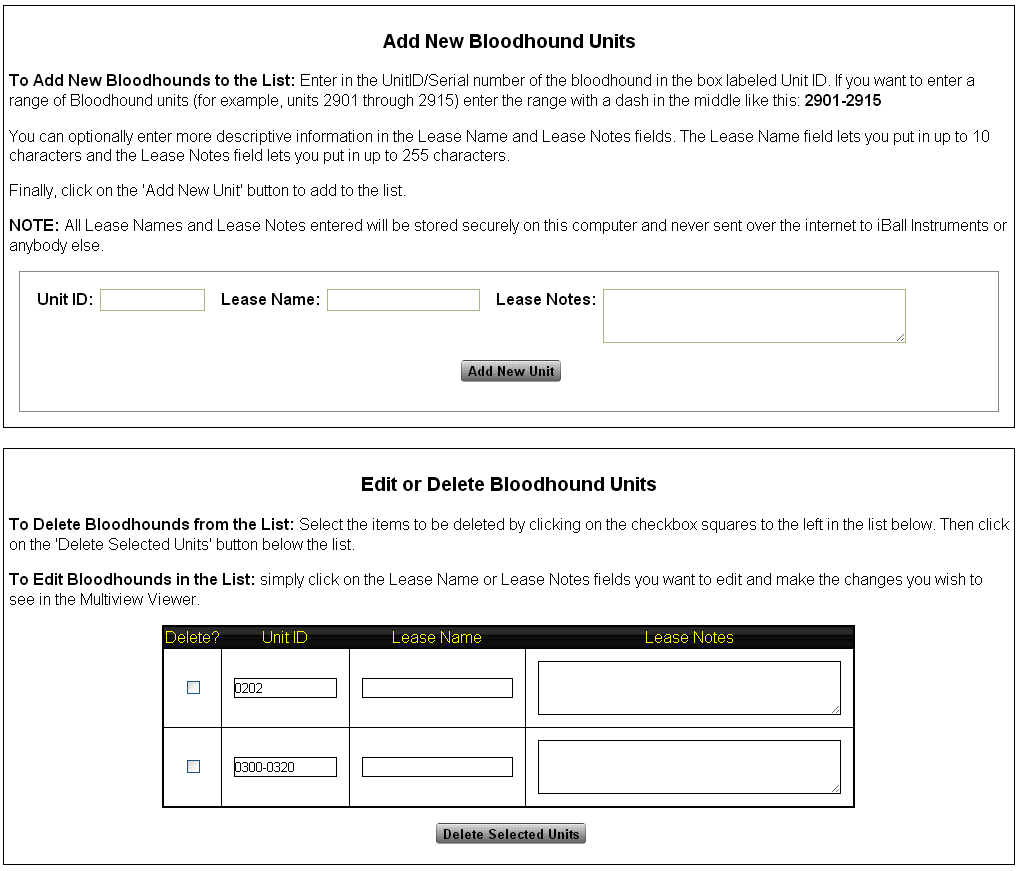
Before you can view data on drill sites being collected by Bloodhound units in the viewer, you will need to select which sites you want to monitor. The first time you visit Multiview you are automatically redirected to the Session Editor so you can build this list.
To add Bloodhounds to your monitoring list, simply enter a 4 digit Bloodhound ID in the text box labeled Unit ID near the top of the Session Editor Page. You can also optionally add in a descriptive title of the well operation under "Lease Name" and more descriptive information under "Lease Notes."
NOTE: All Lease Names and Lease Notes entered will be stored securely on this computer and never sent over the internet to iBall Instruments or anybody else.
Once you have entered the information, simply click on the "Add New Unit" button under the area where you entered your information.
If you want to enter a range of Bloodhound units (for example, units 2901 through 2915) enter the ID range with a dash in the middle like this: 2901-2915
To change information about a well site or to delete a well site, scroll down to the Session Editor page section labeled "Edit or Delete Bloodhound Units."
To Delete Bloodhounds from the List: Select the items to be deleted by clicking on the checkbox squares to the left in the list below. Then click on the 'Delete Selected Units' button below the list.
To Edit Bloodhounds in the List: simply click on the Lease Name or Lease Notes fields you want to edit and make the changes you wish to see in the Multiview Viewer.
The Multiview Viewer
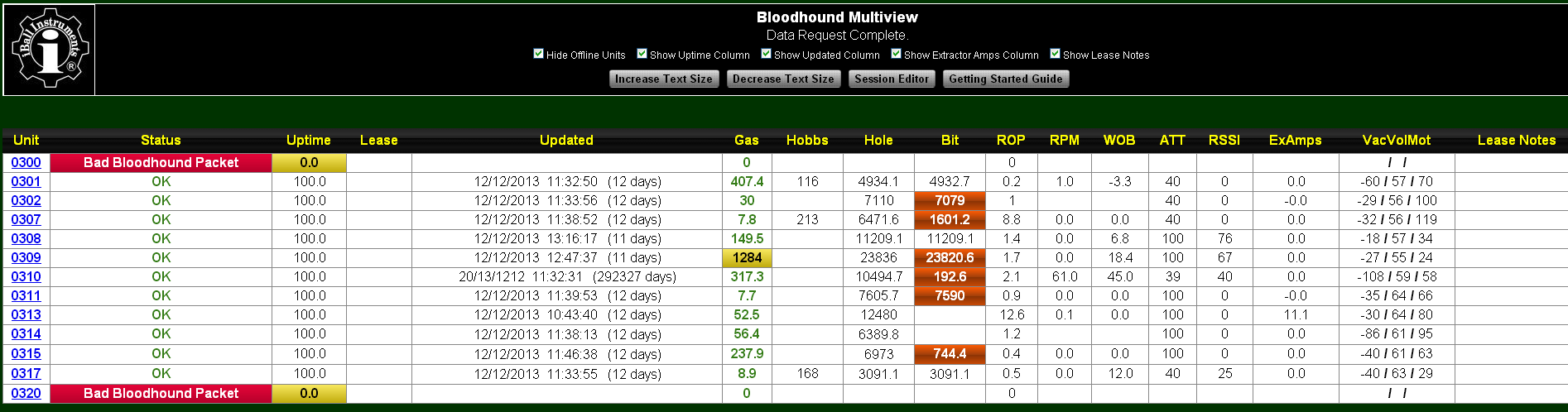
The Viewer is where the data from the wells and Bloodhound equipment you wish to monitor is displayed. The data table has up to 17 color-coded columns of the most commonly viewed data. Each row represents a different well site.Moving a mouse cursor over any column header will make a descriptive "tool-tip" appear describing the column.
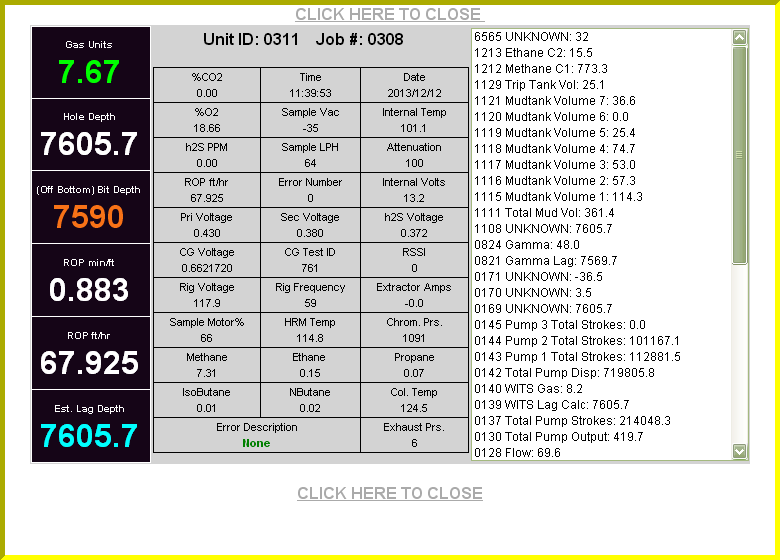
The Detail View Moving the mouse cursor over the leftmost field will cause the Detail View window to open showing all available Bloodhound data in a format similar to that displayed by the iBall Instruments Raw Data Viewer web page.
You can optionally show or hide several of the data columns in the table, as well as make the display text larger or smaller by using the labeled check boxes and buttons at the top of the Multiview Viewer page.
Please note that parts of the table view and detail view (such as RPM, Bit Depth, and Weight on Bit) are only available when there is a working WITS protocol data connection from the EDR computer to the Bloodhound.
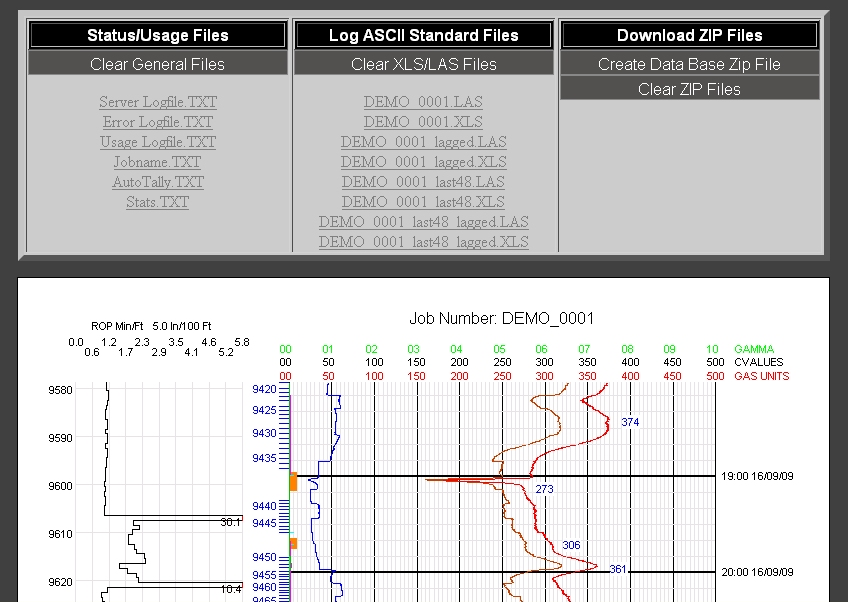
Even more drilling site data including charts can be seen by clicking on a Bloodhound Unit ID value in the leftmost column will take you to that Bloodhound unit's home page called The Raw Data Viewer where detailed ROP and gas data charts are available with a logon name and password.
Any Questions?
If you are still having trouble setting up, using, or understanding the iBall Multiview Web Application after going through this guide please don't hesitate to call for help.
The most important feature of all our products is our dedicated customer support through a dedicated team for that purpose alone.
This team, called Bloodhound Rental Support Service (BRSS) provides thorough training for those new to our products. We also have American based telephone support 24/7/365 staffed by highly trained and experienced experts who are experienced mud loggers and geologists.
Return To Multiview